A dialer can help a sales rep make more calls. It cannot, by itself, make those calls more disciplined, relevant or commercially useful.
That is the gap most sales teams in India face today. They install an Android calling app, import a list, start dialing and assume the sales process is now under control. A few weeks later, managers still cannot answer basic questions:
- Which leads should each rep call next?
- What happened during the conversation?
- Was a callback scheduled?
- Why are follow-ups being missed?
- Which behaviours are improving conversion?
- Which calls need coaching?
The best Android cold calling app for sales teams in India should not stop at dialing or call tracking. It should help the rep prepare, call, record the outcome and take the next action.
That is the thinking behind ColdCall by thYnkWISE, an AI calling execution layer for sales teams.
What basic Android calling applications miss
A basic Android dialer usually solves one narrow problem: placing calls faster.
A call tracker may add call history, duration and a few reports. That is useful, but it still leaves the sales team responsible for managing the rest of the workflow through memory, spreadsheets and disconnected CRM updates.
The result is predictable:
- Reps call leads without enough context.
- Managers measure activity instead of execution quality.
- Follow-ups remain buried in personal notes.
- Call outcomes are recorded inconsistently.
- CRM data becomes incomplete.
- Coaching happens only after a problem becomes visible.
An Android cold calling app with lead management must connect the lead queue to the call, the call to the outcome and the outcome to the next action.
Simple is always smart. The workflow should be easy for the rep to follow and visible to the manager.
What a complete cold calling workflow requires
A useful sales calling system should support four connected stages.
1. Before the call: decide who to call and why
The rep should not begin the day with an unstructured contact list.
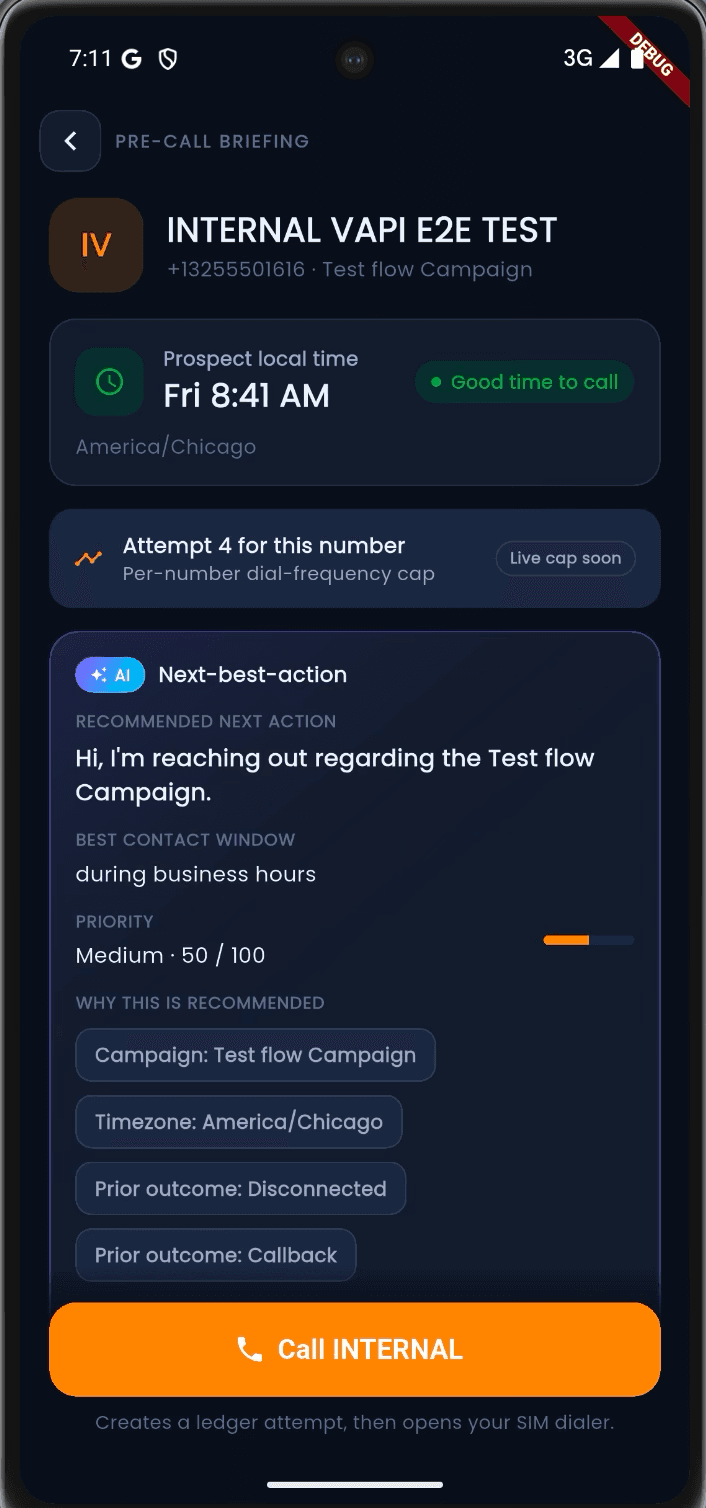
ColdCall helps teams organise lead queues, campaigns, calling windows, prior outcomes and callbacks. The rep can see which conversation should happen next and review relevant context before dialling.
This is important for an AI sales dialer for inside sales teams. AI should not simply increase call volume. It should help the rep make a better decision about timing, priority and preparation.
2. During the call: keep the rep focused
Sales representatives should not spend the conversation searching through multiple tools.
ColdCall supports a web workspace, an Android 12+ app and eligible Chrome or browser calling workflows. Depending on the route, tenant configuration, permissions and consent, reps may receive live guidance, transcription and coaching support.
This creates a more practical form of a cold calling app with AI coaching and transcription. The AI supports the conversation, but the rep remains responsible for listening, asking questions and understanding the buyer.
AI should augment human capability, not replace human conversations.
3. After the call: capture what actually happened
The call is not complete when the other person says goodbye.
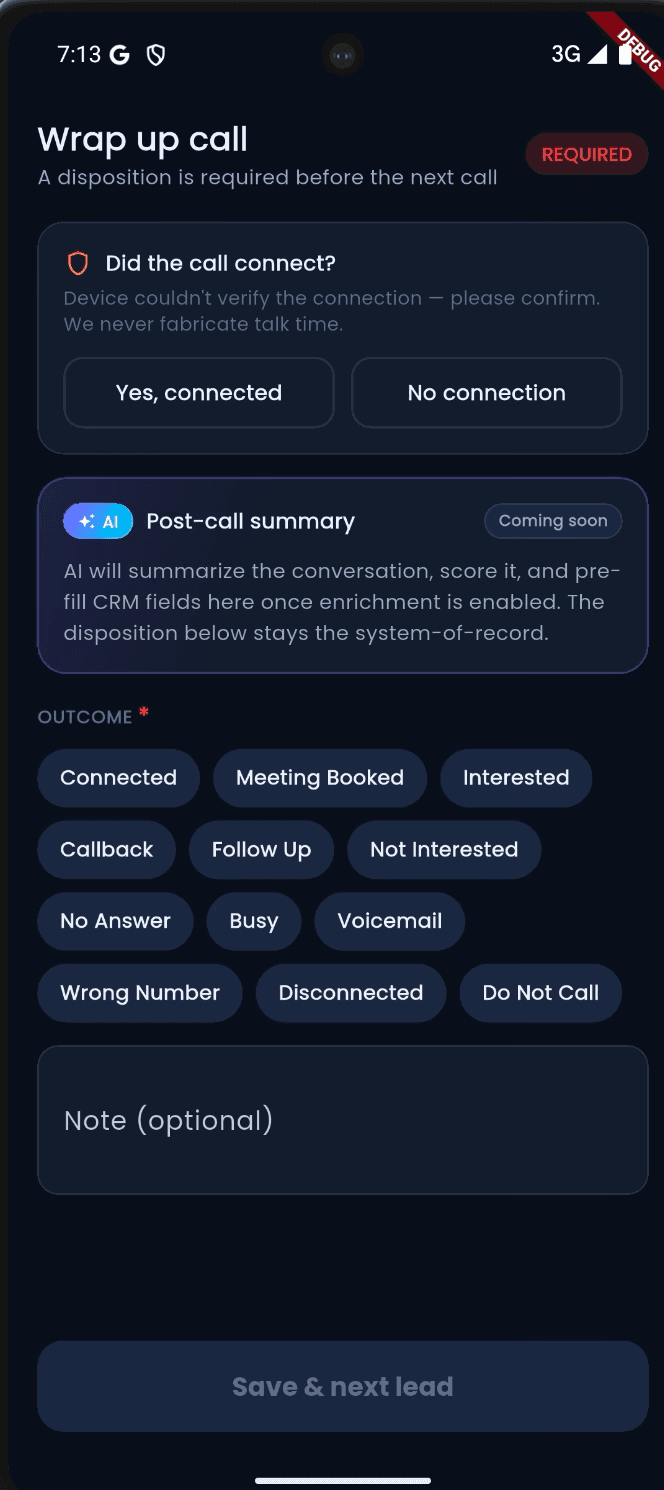
The team needs a usable record of the outcome, including:
- Contacted or not contacted
- Conversation result
- Qualification status
- Objection or requirement
- Next action
- Callback date and time
- Notes for the next conversation
ColdCall supports mandatory dispositions, notes and callbacks. This makes it a form of cold calling software with mandatory call dispositions, where the next action cannot disappear into an informal notebook.
4. For managers: identify where execution is breaking
Managers need more than total calls.
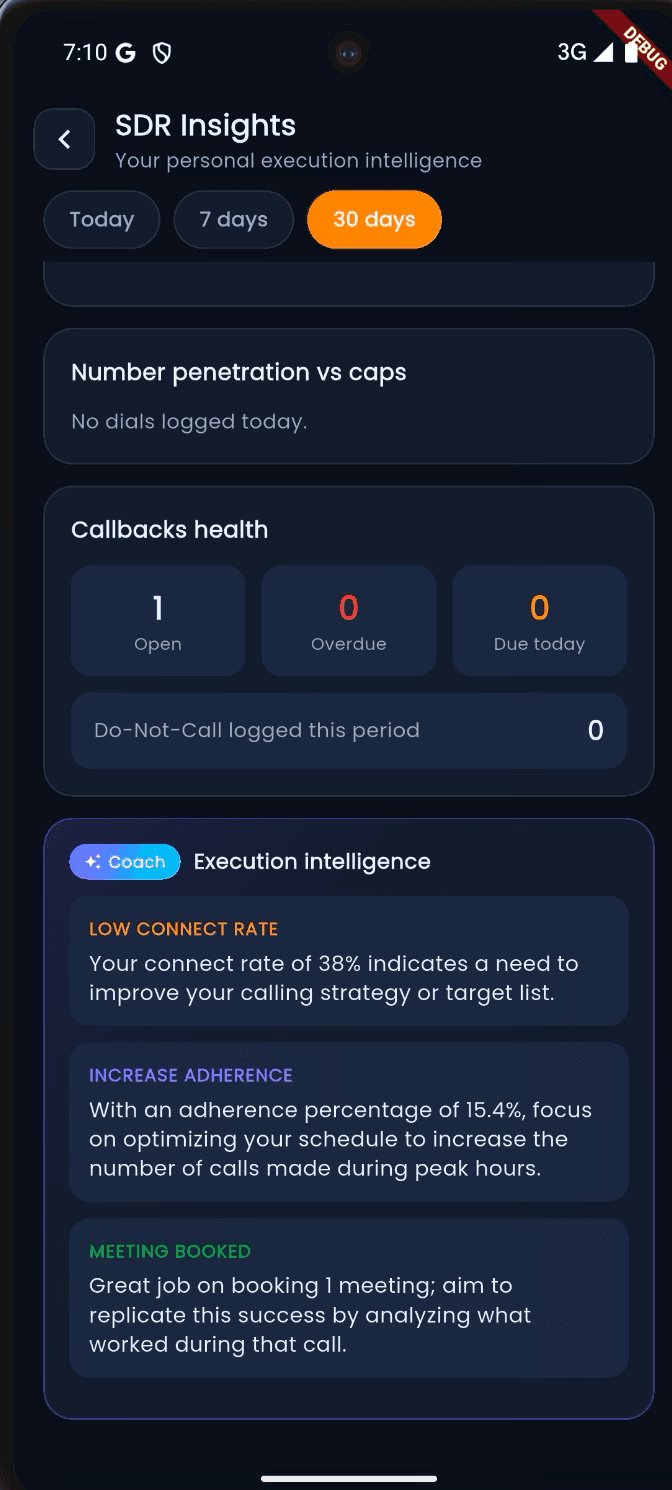
They need visibility into connect rates, disposition patterns, calling-window adherence, callbacks, campaign activity and coaching opportunities. ColdCall turns structured calling activity into manager reporting, QA reviews and scorecards where configured.
The goal is not to monitor people unnecessarily. It is to identify which part of the sales process needs attention.
ColdCall compared with a basic Android dialer
| Capability | Basic Android dialer or tracker | ColdCall by thYnkWISE |
|---|---|---|
| Contact list | Static list or imported contacts | Queues, campaigns, ownership and smart allocation |
| Call preparation | Usually manual | Context, prior outcomes, timing and AI next-best action |
| Call activity | Basic history or duration | Supported call events connected to lead and campaign records |
| Outcome capture | Optional notes | Mandatory dispositions, notes and callbacks |
| Follow-up | Depends on rep memory | Scheduled callbacks and visible next actions |
| CRM workflow | Often separate from calling | CRM-connected workflows and contact timelines |
| AI assistance | Limited or absent | Pre-call guidance, eligible live coaching and suggested wrap-up |
| Manager visibility | Activity reports | Performance reporting, QA scorecards and coaching workspace |
| Multichannel process | Often separate tools | Workflow, SMS and WhatsApp orchestration where configured |
| AI voice capability | Usually not included | AI voice-agent orchestration with human handoff on Command |
This is why ColdCall is more than an Android auto dialer with CRM and call recording. It is designed around execution discipline, not just call volume.
Android, browser and call recording: what teams should know
ColdCall is designed for compatible devices running Android 12 or later.
The Android app supports the rep’s daily workflow, including lead queues, call context, supported call activity, dispositions and callbacks. The web workspace gives managers and administrators a broader view of campaigns, users and reporting.
Eligible browser routes can add live two-sided transcription and coaching. However, this distinction is important:
ColdCall does not claim that every handset call is automatically recorded or transcribed.
Recording, transcription and live two-sided audio depend on:
- The device and operating system
- The approved calling route
- Tenant configuration
- App and browser permissions
- Required customer or participant consent
- Carrier and provider availability
A normal handset call does not automatically expose the other participant’s audio to Chrome. If a team needs live two-sided transcription, the call must use an eligible browser dialler or WebRTC route.
Before rollout, review the mobile privacy information, extension privacy information and relevant support documentation.
AI before, during and after the conversation
ColdCall places AI at three useful points in the workflow.
Before: next-best action
The system can use campaign information, time zones and prior outcomes to recommend what should happen next.
During: live support where supported
On eligible browser calls, live transcription and coaching can help the rep stay aligned with the conversation. The rep still decides what to ask, how to respond and whether the opportunity is worth pursuing.
After: wrap-up and coaching
AI can assist with suggested wrap-up, summaries and coaching signals where the configured route supports these capabilities. Managers can then review patterns rather than relying only on anecdotal feedback.
This makes ColdCall relevant for an AI cold calling software for Android sales reps workflow, while keeping the human representative at the centre of the conversation.
ColdCall for different sales teams
The same execution principles apply across several industries.
For a sales calling app for SDR teams in India, ColdCall helps structure prospecting queues, qualification calls and callbacks.
For an Android calling app for B2B sales teams, it keeps account context, stakeholder information and next actions visible.
For a cold calling app for real estate sales teams, it can support campaign-based lead allocation, scheduled callbacks and outcome tracking across high-volume enquiries.
For teams looking for a cold calling app with WhatsApp and CRM integration, workflow, SMS and WhatsApp orchestration are available where configured and included in the selected service level.
The application changes by industry. The execution requirement does not: every conversation should produce a clear next action.
Choosing the right service level
ColdCall offers three service levels.
| Plan | Price | Best suited for |
|---|---|---|
| Call | ₹299 per licence/month | Teams building disciplined queues, dispositions and callback habits |
| Coach | ₹499 per licence/month | Growing teams that need AI guidance, browser workflows and manager reporting |
| Command | ₹999 per licence/month | Revenue teams adding QA, scorecards, AI voice-agent orchestration and human handoff |
Prices exclude applicable taxes and third-party usage. Carrier, number, messaging, transcription and AI-provider charges may be separate where used.
Most teams should begin with the operating problem rather than the most advanced feature. If the current process lacks consistent outcomes and callbacks, Call may be enough to establish the habit. If managers need coaching and eligible browser assistance, Coach is the practical next step. Command is designed for teams that need governed human and AI orchestration at scale.
Implementation checklist for sales leaders
Before introducing any Android cold calling application, confirm these points:
- Define the call stages and what each disposition means.
- Decide which outcomes are mandatory.
- Create lead queues by campaign, market, territory or priority.
- Set callback rules and ownership.
- Confirm compatible Android 12+ devices.
- Test the approved calling route with a small pilot group.
- Confirm recording, transcription and consent requirements.
- Connect the workflow to the CRM where required.
- Train managers to coach behaviours, not just activity totals.
- Review performance after two to four weeks and simplify anything reps are avoiding.
This is the FIT Formula in practice.
Infrastructure includes the Android app, web workspace, CRM connection, queues, campaigns and reporting.
Talent includes the rep’s judgement, listening, questioning, resilience and ability to build trust.
Better infrastructure cannot compensate for poor sales talent. But talented reps also struggle when the infrastructure hides context and makes follow-up difficult.
Final takeaway
The best Android cold calling app for sales teams in India is not necessarily the one that promises the most calls per hour.
It is the one that helps a team consistently answer five questions:
- Who should I call next?
- What do I know about this lead?
- What should I focus on in the conversation?
- What happened during the call?
- What is the next measurable action?
ColdCall by thYnkWISE is built around that execution loop. It brings together Android calling workflows, web-based management, lead queues, AI guidance, supported transcription, mandatory outcomes, callbacks, coaching and reporting.
If your team is comparing a basic dialer with a complete sales execution layer, visit coldcall.in or book a 15-minute demo.
Start with the workflow your team needs to improve. Then choose the technology that makes that workflow easier to execute.
Frequently asked questions
What is the best Android cold calling app for sales teams in India?
The right choice depends on the team’s workflow. ColdCall is designed for teams that need more than dialing, including lead queues, CRM-connected workflows, mandatory outcomes, callbacks, AI assistance and manager visibility.
Does ColdCall work on Android phones?
ColdCall is designed for compatible Android 12+ devices. Exact feature availability depends on the phone, permissions, tenant configuration and approved calling route.
Does ColdCall automatically record every call?
No. Recording and transcription depend on the device or eligible browser route, configuration, permissions and legally required consent. Normal handset calls do not automatically expose the other participant’s audio to Chrome.
Is ColdCall a mobile cold calling CRM for sales teams?
ColdCall combines an Android rep app with a web workspace. It supports lead queues, context, supported call activity, dispositions, callbacks, contact timelines and manager reporting.
Can ColdCall support WhatsApp and CRM workflows?
Workflow, SMS and WhatsApp orchestration can be supported where configured. Messaging and provider usage charges may be separate from the licence price.
Which ColdCall plan should a sales team choose?
Call is suitable for building the basic execution habit. Coach adds AI guidance, eligible browser workflows and manager reporting. Command adds AI voice-agent orchestration, human handoff, QA scorecards and advanced workflow orchestration.
How can I see ColdCall before choosing a plan?
You can book a 15-minute product demo or complete the Calling Adoption Score assessment.